Rotate your sites without keeping notes
The problem
Rotation is one of those things that is simple in principle and impossible to hold in your head. Six sites, one injection a week, and a note somewhere that you stopped updating in March.
What Dozify does
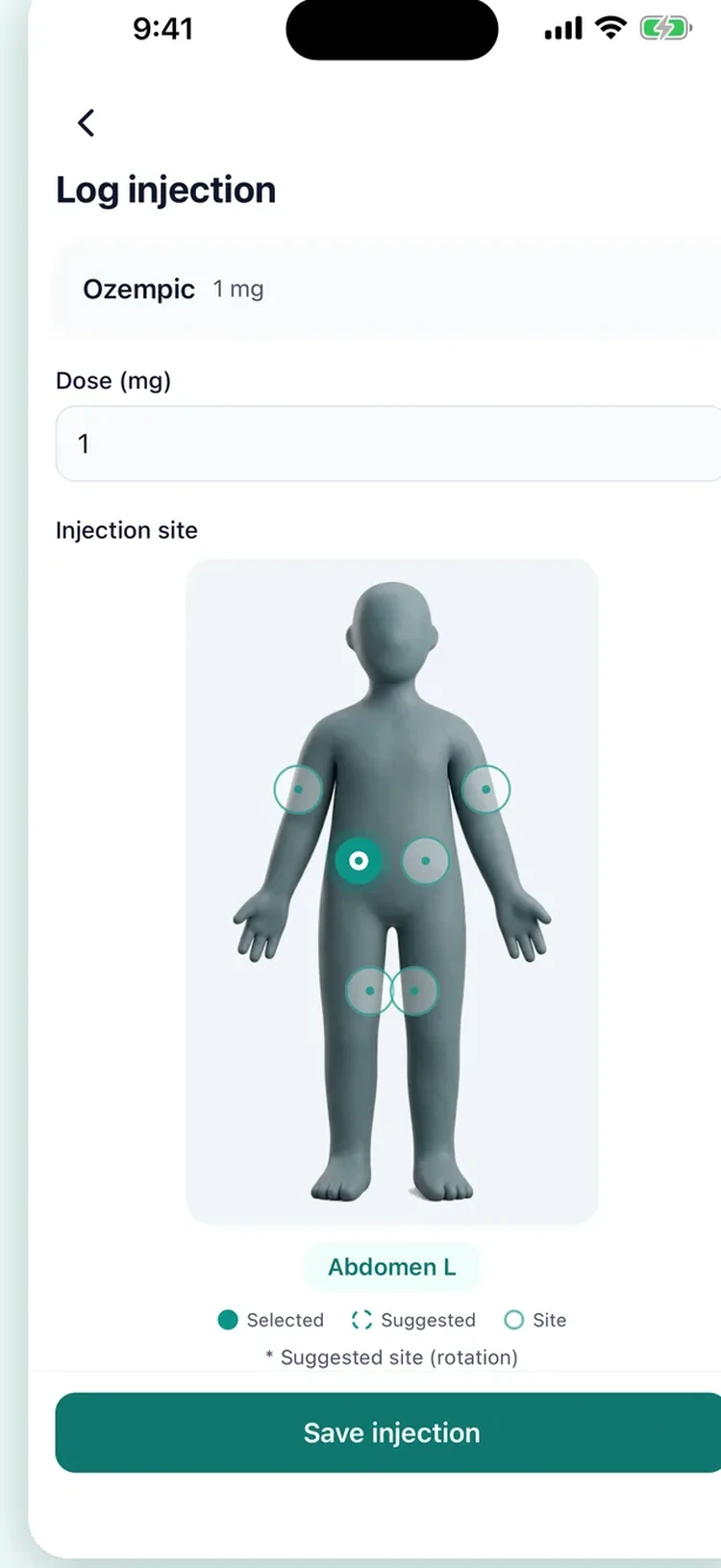
A map instead of a memory
Tap where you injected. The next time, the spot you have used least recently is already selected.
Your own site names
If you rotate somewhere the diagram does not name, write it in. The app will not draw an anatomy it does not know, but it will remember your label.
A gentle warning, not a rule
Pick a site you used last week and the app says so. It does not stop you: it is your body and your clinician's instruction.
Who this helps
People who have been told to rotate and not given a way to keep track of it, and people who have started to notice that one patch of the abdomen feels different from the rest. It also helps anyone injecting more than once a week, where the pattern is harder to hold in your head than a single weekly spot.
Where it stops
The body map records where you injected and suggests which area comes next in the rotation. It does not examine the site: it cannot tell you whether the skin there is suitable today, and a lump or a hardened area is something to show a clinician, not something an app should judge. The approved areas come from the manufacturer's instructions for your medication, and those instructions are what to follow if they differ.
Private by default
Your health records stay on your device and are never uploaded; the one exception is a meal photo you choose to analyse with AI calories, sent only after you agree and not stored by the app. There is no account and no cloud sync. Usage statistics never carry a medication name or a symptom, details in the privacy policy.
Questions
Which sites can I choose from?
The abdomen, the thigh and the upper arm, split into left and right and into the areas within each. Those are the areas the manufacturers' instructions describe for subcutaneous GLP-1 injections.
How does the suggestion work?
It looks at where your recent injections went and points at the area you have used least recently. It is a suggestion on the screen, not a rule: you can log anywhere you actually injected.
Does it warn me if I use the same spot again?
It shows you what you have used recently, so a repeat is visible before you log it. It does not block anything; you may have a reason, and the app does not overrule you.
I inject in the same area every time. Is that a problem?
That is a question for your clinician or pharmacist. What Dozify can do is show them the pattern: the report includes where your injections have gone over the period you pick.
Does this replace the leaflet that came with my pen?
No. The leaflet is the instruction; this is a record of what you did. Where the two disagree, the leaflet is right.
Read next
Guides, with their sources named: where to inject and how to rotate, how to inject a pen, step by step and managing common side effects and what the labels report about lumps at a site.
Elsewhere in Dozify: the shot tracker and the side-effect journal.
New in Dozify: snap a meal and the app drafts calories and protein per item for you to edit — AI calorie tracking (Premium) — and daily GLP-1 tablets have their own pill tracker.